Advanced Statistical Programming using R
Week 3: Debugging
2026-04-29
Announcements
Reminders
- Check the updated schedule for changes due to holidays: https://soda-lmu.github.io/StatProg2-2026-SoSe/#schedule
- Think about data sources & group formation!
- Commit into your individual git reflection logs
- Contacting Us:
- For individual questions:
statprog[@]stat.uni-muenchen.de - For course related questions: Moodle Discussion Forum
- For individual questions:
This week (Apr 30): Practical is directly after the Lecture
Practical will be on 30/04 at 12-2pm (c.t.) in room Schellingstr. 3 (S) / S 004
Exam dates
Oral exams are scheduled for Jul 30.
The exams will:
- assess your judgement and reasoning
- explain decisions,
- defend choices,
- and reason about alternative
- be based on group project and individual practical exercises
More details to be provided closer to the examination date.
Syllabus
Part 1: Statistical Programming Foundations (W2–6)
- W02: Scripts, Functions & Refactoring
- W03: Debugging
- W04: Version Control & Collaborative Coding
- W05: Quarto websites
- W06: R Packages
Open datasets
Last Week
- Reviewing functions in R
- Testing functions
- Writing (better) functions (for data science tasks)
Function Syntax in R
| Part | What it does |
|---|---|
function(arg1, arg2 = default) |
declares the function and its inputs |
{ ... } |
body — the code that runs |
return(...) |
what the function hands back (optional) |
Tip
If there is no return(), R returns the value of the last expression.
Testing & Validating Functions
Test on known inputs, then stress-test
Warning
R coerces types silently — wrong answers with no error are worse than a crash.
Validate inputs explicitly
stopifnot() — quick but blunt:
if / stop() — custom message:
“you gave me THIS, but I need THAT”
Strategies for better functions
DRY → DRRY
- DRY: Don’t Repeat Yourself
- copy-paste 3 times → write a function (targets repetition)
- DRRY: Don’t Re-Read Yourself
- re-read a block 3 times → improve a function (targets cognitive load)
Outside-In vs Inside-Out
- Outside-In: write the call before the body — design the interface first
- Inside-Out: start with working code, chunk it into named ideas, then abstract
Tip
If you struggle to name a function, it’s probably doing too many things.
This Week
- Responsible AI usage
- Asking for help
- Debugging tools and strategies
Using LLMs for Data Science
rAI learning space by aiHorizon
We’ll be using the rAI learning space by aihorizon R&D. in the course — a web-based platform that gives you access to several state-of-the-art LLMs through one interface, including OpenAI’s GPT family (GPT-5.2, GPT-4o, o3-mini), Microsoft’s Phi and MAI models, and locally-hosted models. You can pick the model that fits each task.
- We have arranged a free premium subscription for the class at least until the end of the semester. That’s free access to state-of-the-art models that would otherwise cost around €20/month each. Use it for this course, for other courses, or for personal projects — it’s yours to use however you like.
- Using it is optional, but strongly suggested. We’ll use it in the lectures and practicals moving forwards.
Setting up your LLM workspace
- Mental framing: Management Skills
- application domain, standard practices, style guidelines, feedback and iteration
- task abstract and allocation, verification and evaluation
- collaboration, transparency, documentation
We focus on using LLMs via chat-based interfaces, but these principles can also apply to other types of generative AI tools.
Data science project management
What sub-tasks and workflows are involved in a data science project?
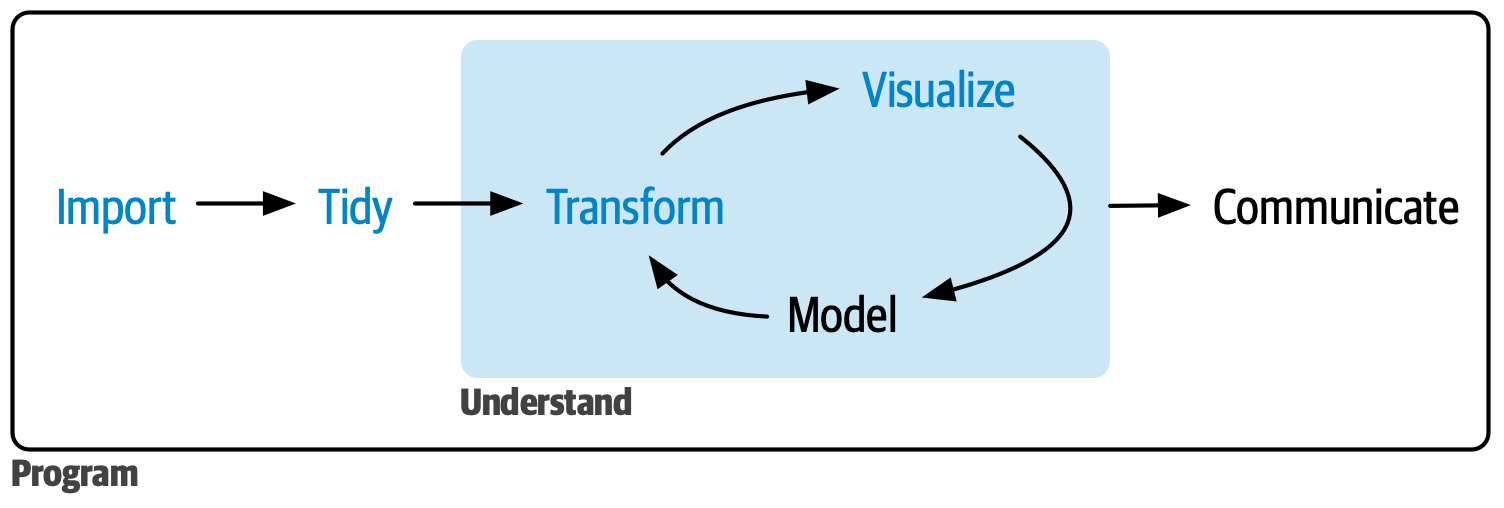
Data science tasks in more detail…
What kind of inputs and outputs are involved in these tasks?

Coordination and management tools
Imagine you had a team working on a data science project, what standards and processes might you need?
- coding and writing style guides
- file directory and naming conventions
- quality metrics and checklists
- templates and example documents
- how-to guides and documentation
- feedback meetings and notes
- …
Translation to LLM usage
| Task abstraction | LLM concept |
|---|---|
| Project-wide instructions & guidelines | System-wide prompts |
| Setting and completing tasks | Prompts & conversations |
| Producing intermediate and final outputs | LLM-generated outputs |
| Evaluation and feedback | Tests and quality assurance |
| Scaling up / recruiting new team members | Agentic models; context & harness engineering |
System Prompts
A system prompt is a hidden instruction block sent to the LLM before the conversation begins.
What to include:
- Role & context (who you are, what the task is)
- Coding style rules (pipe, naming, packages)
- Task-specific behaviour (how to handle debugging, errors)
- Response format (length, tone, what to skip)
You are helping me with an advanced statistical
programming course in R.

Code style:
- Use the tidyverse (dplyr, tidyr, ggplot2, purrr).
- Use the native pipe |> rather than %>%.
- Follow the tidyverse style guide: snake_case,
  <- for assignment, two-space indent.
- For file paths use the `here` package.

When I ask for help debugging:
- First explain what the error message means.
- Then suggest where to look, BEFORE proposing a fix.
- Only write a full rewrite if I ask for one.

General:
- Do not apologise. Do not pad with filler.
- If I paste code, do not silently rename variables
  or change the pipe style.
Testing and Validation
You are responsible for LLM output — it can look correct and still be wrong. The same principle as function testing applies: verify on known inputs first, then stress-test edge cases.
Exact checks (for well-defined outputs)
- Code: does it run without error?
- Code: does it produce the expected output on known inputs?
- Data: do row/column counts match expectations?
- Numbers: can you verify by hand on a small example?
Judgement checks (for open-ended outputs)
- Does the result make sense given domain knowledge?
- Compare a sample against your own manual answer
- Re-run: is the output stable? (LLMs are stochastic)
- Is the reasoning coherent, or does it just sound confident?
Disclosing LLM Usage
- What to disclose?
- scope of usage, degree of automation
- model/system details
- validation & interpretation
- …
- Check out:
GUIDE-LLM Example
A.1: LLMs were used in this project for…
- Research design
- Data processing
- Analysis
- LLM as research object
- Participant-facing settings
- Communication
Example answer
An LLM pipeline was used to generate multiple text variants with the same meaning of harmful online content inputs, including both clean and adversarial texts.
For each input, the LLM produced several paraphrased samples that preserve the original meaning. Predictions were obtained for both generated samples and the original input, then aggregated to produce the final prediction.
…
Errors & Asking for Help in R
Review from StatProg1 & based on:

Three types of conditions in R
| Type | What happens | What to do | |
|---|---|---|---|
| 🚨 | Error | Code stops, no result | Must fix before continuing |
| ⚠️ | Warning | Code runs, result may be wrong | Inspect output carefully |
| 💬 | Message | Code runs, informational only | Read it — something may have changed |
Warning
Silent errors are worse than all three — code runs, result is wrong, no message at all. Always sense-check output against what you’d expect.
Common Error Messages
Variable doesn’t exist — typo, or earlier code not run.
Package not loaded — add library(dplyr).
sample$x — sample is a function, not your data frame.
Argument name doesn’t exist for this function — check ?log.
Required argument not supplied — check the function signature.
Not installed — run install.packages("pkg") first.
Troubleshooting Strategies
- Read the message — it tells you where and why; common errors become recognisable with experience
- Search the message — copy the generic part, add “R” + package name, search; Stack Overflow usually has it
- Divide and conquer — run smaller pieces until you find the line that causes the error
- Read the documentation —
?function_nameshows valid arguments, types, and examples - Restart R — clears stale variables and masked functions (
Session → Restart RorCmd/Ctrl+Shift+F10)
Tip
If you frequently struggle to locate errors, break long pipelines into named intermediate steps — easier to inspect and easier to debug.
Asking Good Questions
Writing a good question helps others understand your problem — and often helps you find the solution yourself.
- Be clear and concise — explain what you’re trying to do and what isn’t working
- State what you expected — describe the output or behaviour you were hoping for
- Provide a minimal reproducible example (reprex) — a small, self-contained snippet that reproduces the issue
- Style your code — use proper indentation and spacing to make it easy to read
- Include the full error message — copy and paste the exact error, don’t paraphrase
- Show what you’ve already tried — briefly mention other approaches to avoid duplicate suggestions
Example: Good & Bad Questions
- no error message included
- local file path nobody else can open
- no description of expected vs actual output
- three operations chained — impossible to isolate where it fails
Good question
- subject names function and error type
- data is self-contained
- exact error message is pasted, not paraphrased
- expected behaviour is stated explicitly
Minimal Reproducible Examples
A good question should include a minimal reproducible example (MRE) of the problem. This allows others to run your code and encounter the issue you want help on.
Minimal
- Remove unrelated code – isolate to the fewest lines that still show the problem
- Limit package dependencies (i.e. stick to base R)
- Use built-in datasets or create some example data.
Reproducible
- Include
library()calls for any required packages - Use
dput()to convert data to code if you must share real data - Set
set.seed()if randomness is involved
Turning object to code with dput()
structure(list(mpg = c(21, 21, 22.8, 21.4, 18.7, 18.1, 14.3,
24.4, 22.8, 19.2, 17.8, 16.4, 17.3, 15.2, 10.4, 10.4, 14.7, 32.4,
30.4, 33.9, 21.5, 15.5, 15.2, 13.3, 19.2, 27.3, 26, 30.4, 15.8,
19.7, 15, 21.4), cyl = c(6, 6, 4, 6, 8, 6, 8, 4, 4, 6, 6, 8,
8, 8, 8, 8, 8, 4, 4, 4, 4, 8, 8, 8, 8, 4, 4, 4, 8, 6, 8, 4)), row.names = c("Mazda RX4",
"Mazda RX4 Wag", "Datsun 710", "Hornet 4 Drive", "Hornet Sportabout",
"Valiant", "Duster 360", "Merc 240D", "Merc 230", "Merc 280",
"Merc 280C", "Merc 450SE", "Merc 450SL", "Merc 450SLC", "Cadillac Fleetwood",
"Lincoln Continental", "Chrysler Imperial", "Fiat 128", "Honda Civic",
"Toyota Corolla", "Toyota Corona", "Dodge Challenger", "AMC Javelin",
"Camaro Z28", "Pontiac Firebird", "Fiat X1-9", "Porsche 914-2",
"Lotus Europa", "Ford Pantera L", "Ferrari Dino", "Maserati Bora",
"Volvo 142E"), class = "data.frame")
Using {reprex} to create MREs
Using {reprex} to create MREs
Use {reprex}
- Install
install.packages('reprex') - Copy your minimal example code
- Run
reprex::reprex() - Preview appears in the Viewer; formatted markdown is on your clipboard
- Paste into the forum
Tip
Writing a reprex often finds the bug for you — the act of making code self-contained reveals the missing library() or stale variable.
Where to Get Help
Course resources
- Moodle Discussion Forum — post questions so classmates benefit too
- Practicals — prepare a small reprex; bring your laptop
AI tools
- rAI learning space — GPT, o3-mini, and local models in one interface
- Useful for explaining errors and suggesting fixes — but verify the output!
Community
- Stack Overflow — search before posting; tag with
[r]and the package name - Posit Community — friendlier tone than SO, great for tidyverse questions
- Package GitHub Issues — only if you suspect a bug in the package itself (search existing issues first)
Tip
Answering questions on the forum (even imperfectly) is one of the best ways to consolidate your own understanding.
Debugging Strategies and Tools
Based on:
From troubleshooting to debugging
You likely used the following strategies in StatProg 1:
- commented out parts of your code and hoped for the best
- interactively tried different arguments or edits
- used
{rainer}or other LLMs to ask for explanations of errors - added
print()/cat()/message()inside your functions
Debugging tools
Just like a repair person has tools for diagnosing and fixing issues with machines, there are also specialised tools for debugging code!
Debugging concepts & tools
- Locating errors:
traceback()andrlang::last_trace()
- Investigating errors in context:
- for your own functions:
browser() - for functions from packages:
debug()anddebug_once()
- for your own functions:
Traceback
Traceback shows the call sequence leading up to an error — useful for understanding where in nested code the error occurred.
Calls
A call is an invocation of a function — every time you write f(x), R executes f and records that invocation on the call stack. The stack grows as functions call other functions, and unwinds as they return. The traceback is also known as the call stack, stack trace, or backtrace.
Calling traceback
When you encounter an error, you can use traceback() or rlang::last_trace() to get location information about the error.
traceback() (base R)
- Numbered list, innermost call first (reverse order)
4: stop("something went wrong!")
3: h(x)
2: g(x)
1: f(1)
rlang::last_trace() (tidyverse)
- Tree layout, outermost call first (easier to read)
Backtrace:
    ▆
 1. └─global::f(1)
 2.   └─global::g(x)
 3.     └─global::h(x)
Tip
If you use tidyverse packages, prefer rlang::last_trace() — it filters out internal calls and shows a cleaner tree. Use traceback() for base R errors or when rlang is not available.
From print() to browser()
print() debugging — scatter calls, re-run, clean up
Tip
browser() gives you the full environment at once — no need to guess which variable to print next.
At Browse[1]> you can inspect x, y, run any expression, or step line by line.
Using browser()
Insert browser() anywhere in a function body
Commands for browser()
At the pause you see Browse[1]>. Key commands:
| Command | Action |
|---|---|
n |
execute next line |
s |
step into next function call |
f |
finish current loop or function |
c |
continue normal execution |
Q |
Quit debugger |
Interactive debugging in RStudio
RStudio highlights the next line to run in the editor, shows current variables in the Environment pane, and the call stack in the Traceback pane.
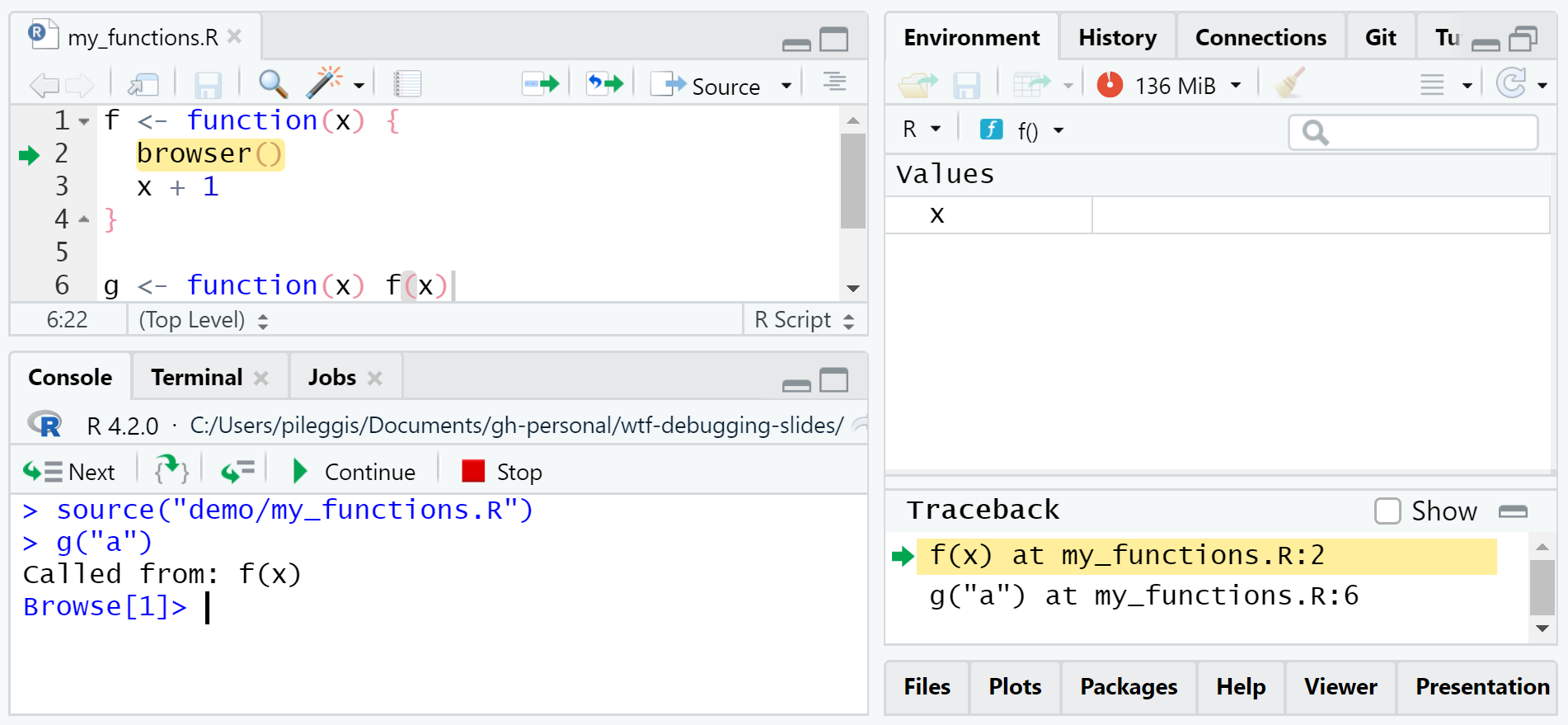
debug() and debugonce()
For functions you don’t want to modify (e.g. from packages), use debug() or debugonce() instead of inserting browser().
debug(fn) — triggers on every call until undebug(fn)
Tip
Prefer debugonce() — debug() can trap you in the debugger if the function is called internally many times.
Errors outside of R
With Quarto, errors can occur outside the R session — in YAML, file paths, or the rendering pipeline.
Common causes
- YAML syntax error (bad indentation, missing
:) - Missing file (image, data, included file)
- Broken cross-reference (
@fig-xxxwith no matching label) - Pandoc conversion failure
Debugging Quarto
- Run
quarto renderin the terminal — more verbose than the RStudio Render button - The error message usually includes a file name and line number
- Add
execute: error: trueto let code chunks fail without halting the render - Comment out chunks one by one to isolate the problem
- Render to HTML first — fastest feedback loop
Tip
YAML indentation errors are the most common: use spaces (not tabs), and check every level lines up correctly.
Summary
LLM usage principles
- Frame AI as a collaborator you manage, not an oracle
- Give it context: domain, task, style guidelines, constraints
- Always verify output — exact checks for code, judgement checks for prose
- You are responsible for everything you submit
Warning
LLMs are fluent, not accurate. A wrong answer written confidently is still wrong.
R Help
- Read the message — it tells you where (function) and why (what went wrong)
- Troubleshoot first: search the message, divide & conquer, restart R, read the docs
- Ask well: write a minimal reproducible example (MRE); use
{reprex}to format it - Where to ask: Moodle forum, Stack Overflow (
[r]), Posit Community
Errors & Troubleshooting
Three condition types
| Type | What to do | |
|---|---|---|
| 🚨 | Error | Must fix |
| ⚠️ | Warning | Inspect output |
| 💬 | Message | Read it |
Troubleshooting steps
- Read the message
- Search the message
- Divide and conquer
- Read the docs
- Restart R
Minimal Reproducible Examples
Minimal
- Remove unrelated code
- Limit package dependencies
- Use built-in datasets or synthetic data
Reproducible
- Include
library()calls - Use
dput()for real data - Set
set.seed()if randomness is involved
Tip
Writing a reprex often finds the bug for you — making code self-contained reveals missing library() calls or stale variables.
Debugging Tools
| Goal | Tool |
|---|---|
| Locate where the error occurred | traceback(), rlang::last_trace() |
| Pause and inspect inside your function | browser() |
| Debug a package function without editing it | debugonce(fn), debug(fn) |
| Debug outside R (YAML, paths, render) | quarto render in terminal |
Please go to the practical!
This week (Apr 30): Practical is directly after the Lecture
Practical will be on 30/04 at 12-2pm (c.t.) in room Schellingstr. 3 (S) / S 004